
If K-dramas or K-pop got you learning Hangul, sooner or later you’ll want to type it. On a computer, typing Hangul usually means adding Korean in your keyboard settings first, and some Korean typing practice sites expect that to be done already. So on November 18, 2026, working past midnight, I picked five free sites that ranked high in Google’s US results for “korean typing practice” and “korean typing test” and checked one thing first: will they work on a plain English keyboard with no Korean input method installed?
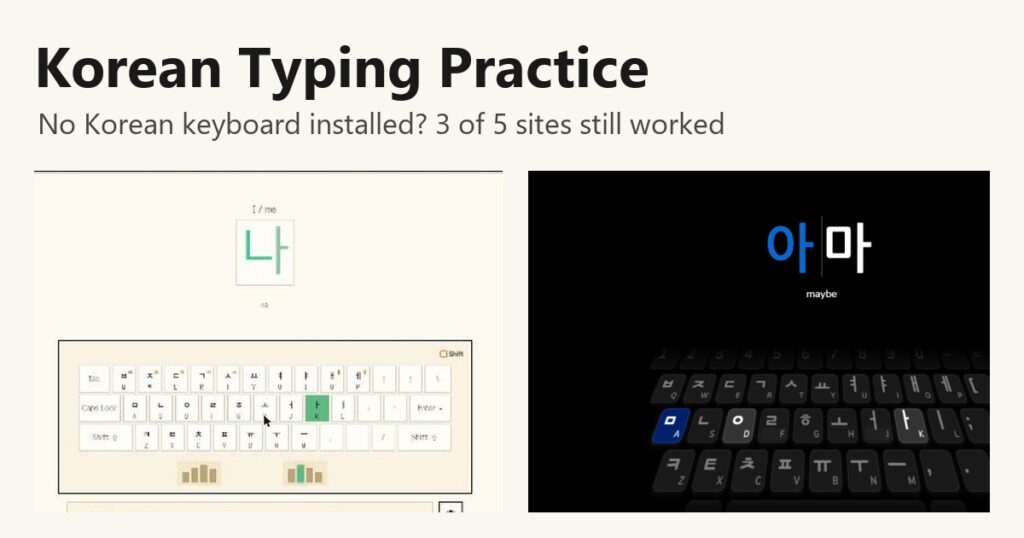
Three of the five did. Type Hangeul, type.sam.today and Hancom Taja turned plain Latin key presses into Hangul on their own. On Type Hangeul, S then K became 나. 10FastFingers and Typingtop didn’t, so they only make sense once you’ve added Korean to your computer’s keyboard settings.
How I tested each Korean typing practice site
Korean keyboards use a layout called Dubeolsik, where each Hangul letter sits on a regular key: ㅁ on A, ㄴ on S, ㅇ on D, ㅏ on K and so on. You type the letters of a syllable in order, and software stacks them into a block. Normally that software is the Korean input method in Windows or macOS. A site can also do the stacking itself, which is what I wanted to find out.
I didn’t type by hand. I sent key presses through browser automation, which behaves like pressing keys on an English keyboard with no Korean input method. On each site I sent Latin keys, for example S then K for 나, and looked at whether the site turned them into Hangul. On the two sites where Latin keys failed, I also sent Hangul words to confirm the site took Korean text. I didn’t sign up anywhere.
Type Hangeul teaches words with meanings and romanization
Type Hangeul opens on a pixel-art title screen with three modes: a game, practice and a puzzle called Hangeul Pang. Practice starts with a short note that says no Korean keyboard is needed, and that held up. I pressed S, then K, and the card showing 나 was accepted and replaced by the next word, 이.
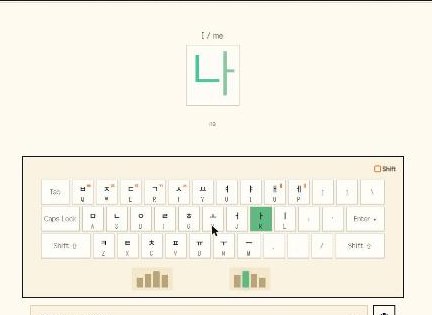
Each card shows the English meaning above the Hangul and the romanization below, so 나 came with “I / me” and “na”. The on-screen keyboard labels every key with both the Hangul letter and the Latin letter, and highlights the next key in the color of the finger that should press it. There’s a per-letter accuracy panel, and the lessons are grouped into 12 units labeled by TOPIK level, from 1급 prep up to a 6급 path.
The game mode, 한글 전투 (“Hangul battle”), has you type a demon’s word to defeat it, and its top-100 leaderboard has a tab for K-pop fandoms. When I opened it, 13 fandoms were ranked, including ARMY, STAY, BLINK and ONCE, and the note said you pick yours in your profile. Starting a battle first asks for a display name to show on that leaderboard, with country and fandom as extra fields. I left it blank rather than create a public entry, so I didn’t play a battle.

type.sam.today goes one key at a time
type.sam.today starts more slowly than the other four. Its FAQ says you don’t need a Korean keyboard or a Korean input method, and that the practice phrases come from TOPIK 1 level vocabulary. It also notes you’ll still need a Korean input method to type in other apps, which is fair.
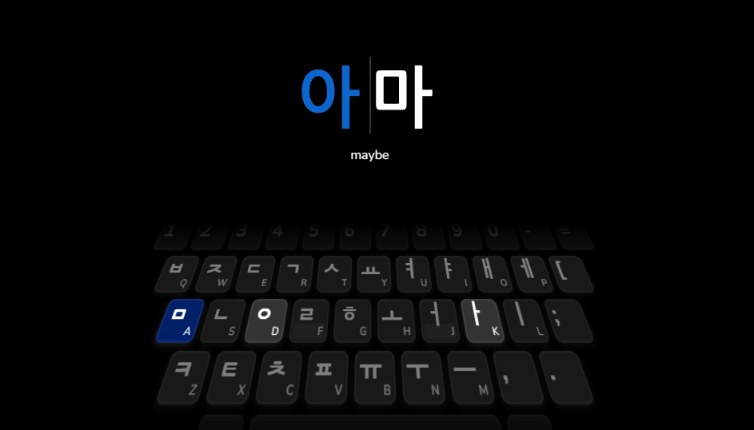
The first lesson introduced ㅁ, ㅏ and ㅇ one at a time, each with its key lit up, and then asked for a real word, 아마 (“maybe”). D then K turned 아 blue, A then K finished the word, and the lesson moved on to ㄴ. The dashboard counts 33 keys and 430 phrases to learn. A login button is there, but I never needed it.
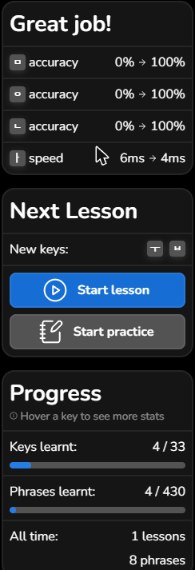
Later I ran a whole lesson. The dashboard still had my earlier progress without any login and listed ㅏ under keys to revisit. The 12 exercises mixed single strokes with short words, and each word came with its English meaning: 아마 (“maybe”), 만 (“ten thousand”), 안 (“not”) and 나무 (“tree”). At the end a “Great job!” panel showed accuracy for ㅁ, ㅇ and ㄴ going from 0 to 100 percent, and the progress bar moved to 4 of 33 keys. It also listed a speed figure, which is meaningless for automated input.
Hancom Taja works too, once you switch it to Korean
Hancom Taja’s web version has a full English interface, and it opened with English sentences. To practice Korean I clicked 한국어 at the top. A box warned that changing the keyboard type resets all typing practice, and after I confirmed, Korean sayings and quotes appeared. Typing A, N, F, D, L produced 물이, the first word of the sentence, with accuracy at 100 percent.
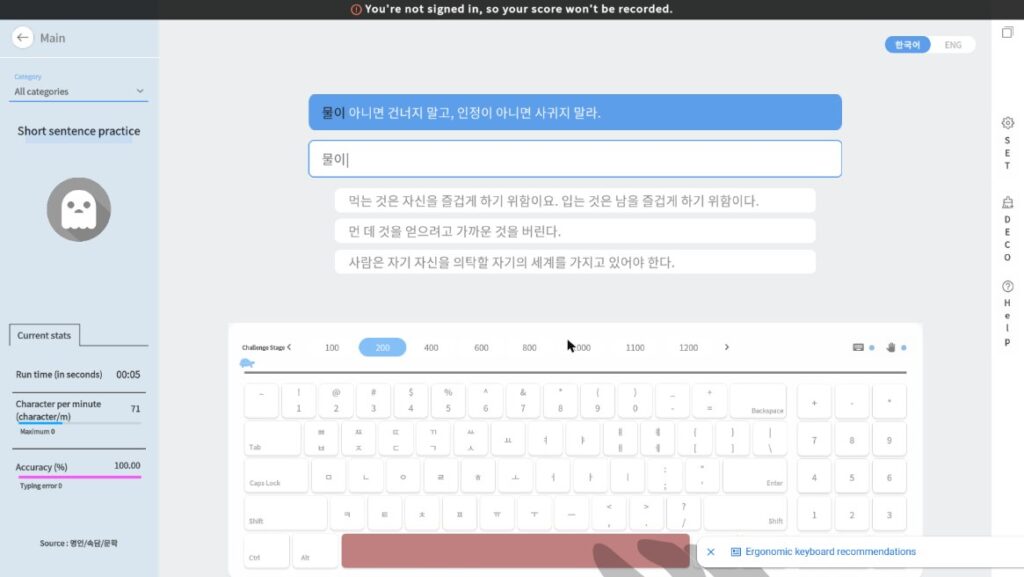
The catch for beginners is that the sentences come without translations or romanization, so this one suits you once you can read Hangul comfortably. In return it lets you change the keyboard layout: in its settings I could switch the Korean layout between Dubeolsik and three Sebeolsik variants, and English between QWERTY and Dvorak. A bar at the top says scores aren’t saved unless you sign in.
10FastFingers and Typingtop need a Korean keyboard installed
Both of these are speed tests. You get a minute of common Korean words. On 10FastFingers, the Latin keys E, P for the first word, 데, just turned it red. When I later sent a Hangul word, 동안, it was accepted and the test moved to the next word. You may land on the Korean-language page, as I did, but the test is the same.

Typingtop behaved the same way. When I sent Latin keys, the input box simply kept them as Latin letters instead of building Hangul, and the first word, 어머니, turned red. In a separate run where I sent Hangul words, the site accepted 과정 and 날 and moved on. Its on-screen keyboard graphic shows only English letters, so it won’t teach you where Hangul sits either.

These two are fine for checking your speed after you’ve set up Korean typing on your computer. Microsoft explains how to add a keyboard in its Windows language settings guide, and Apple explains how to add an input source for another language in its Mac guide to writing in another language.
The five sites side by side
| Site | Works without a Korean keyboard | Romanization or meanings | Best for |
|---|---|---|---|
| Type Hangeul | Yes | Both | Learning words while learning keys |
| type.sam.today | Yes | Meanings | Total beginners, one key at a time |
| Hancom Taja (web) | Yes, after switching to 한국어 | No | Readers of Hangul, Sebeolsik users |
| 10FastFingers | No | No | One-minute speed test |
| Typingtop | No | No | One-minute speed test |
Which Korean typing practice site should you start with?
If you’re starting from zero, begin with type.sam.today, which teaches the keys in small groups, or Type Hangeul if you’d rather pick up vocabulary at the same time. Once you can read Hangul without romanization, Hancom Taja gives you full sentences and a choice of Sebeolsik layouts. Leave 10FastFingers and Typingtop for when Korean is set up on your computer and you want a speed number.
One more thing if you start comparing scores with Korean friends. Most of the Korean-language sites I tested in my Korean post on typing practice sites show speed in 타, keystrokes per minute, rather than words, and two of them counted the same sentence differently: one counted Shift as a keystroke, the other Enter.