
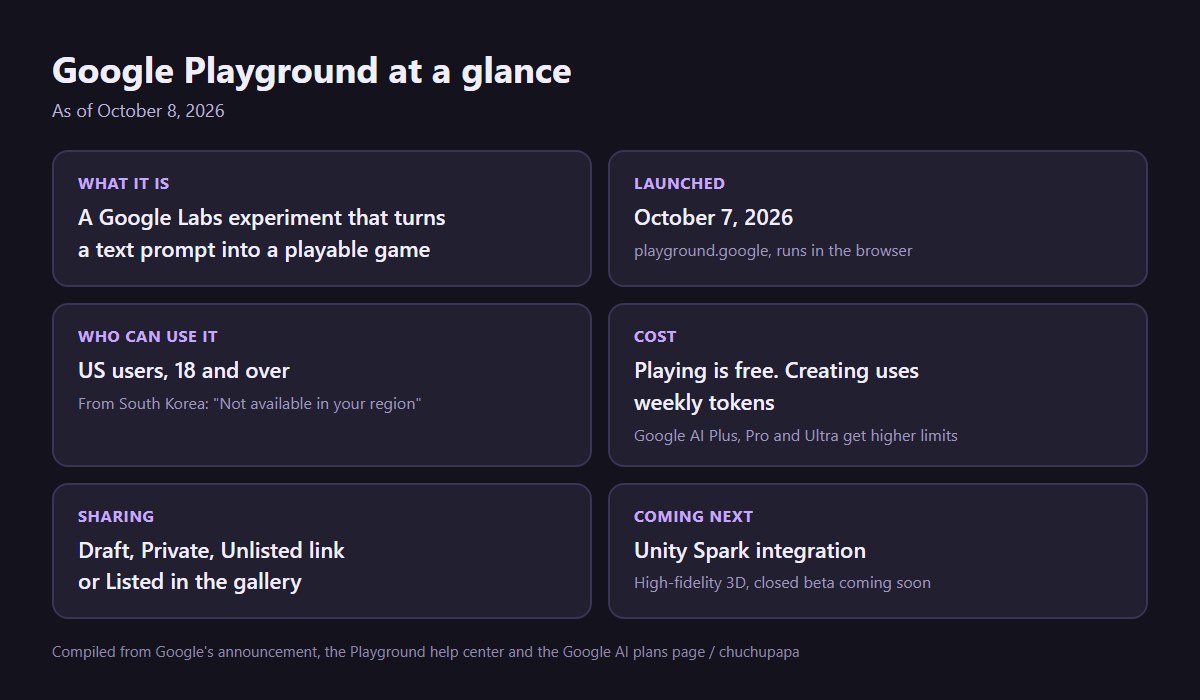
Google Playground is the new Google Labs experiment that builds a game from a sentence. You type something like “a cat that flips gravity every time it jumps,” press Generate, and a few moments later there is a game running in your browser. Don’t like how high the cat jumps? Ask for a change in the chat box and play again.
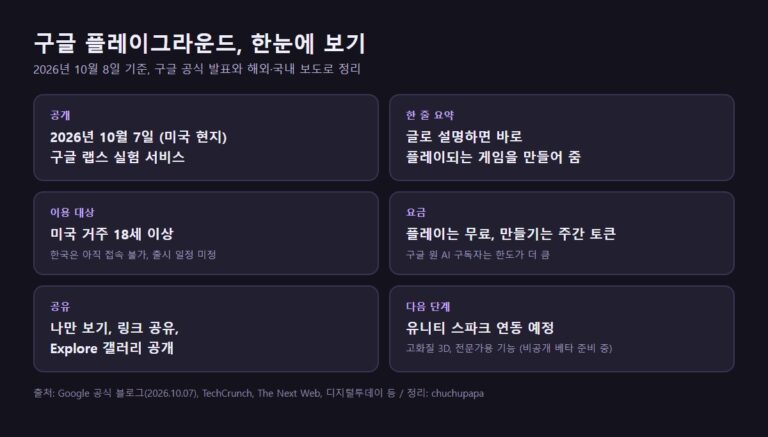
It opened on October 7, 2026, and for now only adults living in the US can use it. This guide uses Google’s announcement, the Playground help center and the Google AI plans page to answer the questions people are actually searching for: how it works, whether it costs anything, how sharing works, and what you see if you are outside the US.
Watch Google’s official Playground video
Google Labs posted a short launch video on YouTube called “Introducing Playground: If you can think it, you can play it.” It runs a little over a minute and gives a quick feel for the prompt-to-game idea before you read the details below.
What is Google Playground?
In Google’s words, it is an experimental platform where you create custom games, play them and pass them around, and an early attempt to lower the bar for making games at all. It sits on the Google Labs homepage next to Google’s other AI experiments. There is nothing to install. Everything runs in a browser, so the games work on a phone or a laptop.
Google’s own post does not name the models behind Google Playground. According to reporting from The Verge and The Next Web, a Google spokesperson said Gemini handles the text, Nano Banana makes the images and Lyria writes the music, plus extra software that Google adjusted using games it made in-house.
One quick note, because the name is easy to mix up. Google AI Studio also has a section called Playground, where developers test Gemini, video, text-to-speech and Live models. That is a separate developer tool. This guide is about the game maker at playground.google.
How to make a game in Google Playground
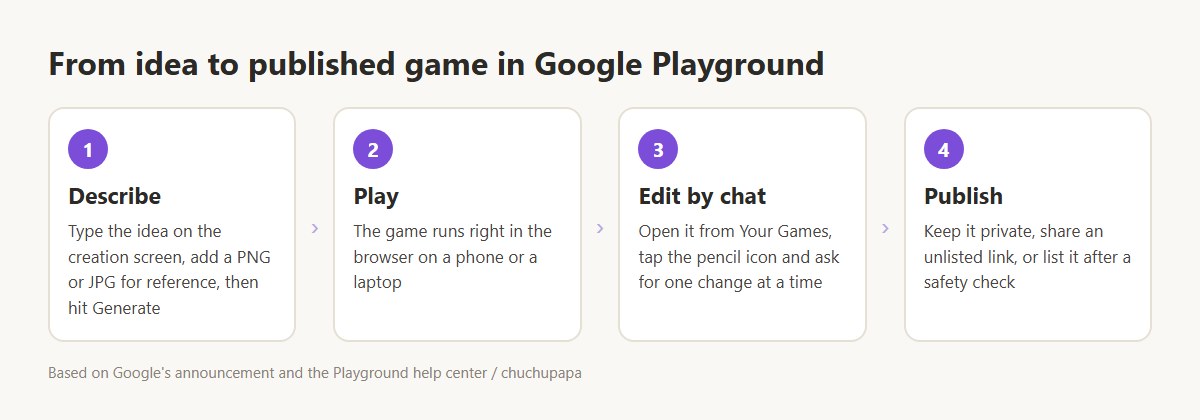
On your first visit, Google Playground asks you to set up a Play Games profile or link one you already have. From there, the steps go like this, based on the Playground help center.
- On the creation screen, describe your game in everyday language, then press Generate. You can begin with an empty prompt, remix one of the starter prompts, or let the guided options help if the idea is still fuzzy.
- Add a reference image if you want a certain look. Only PNG and JPG files work, and the AI uses them as a guide rather than pasting them in. Video uploads are not supported.
- Play the result. TechCrunch reports you can ask for 2D or 3D and choose a genre, with trivia and racing among the examples.
- To change something, go to Your Games, open the game, click the pencil icon and type what you want in the chat box. Rules, how things move, the characters and the backdrop can all be reworked this way.
- When it feels right, publish it. Any edits you make to a published game stay in draft until you publish again, so players keep getting the old version in the meantime.
Two tips from the help center are worth knowing. Small, focused requests work better than one huge prompt with five changes in it. And if a build is heading the wrong way, there is a stop button beside the chat field. If a build errors out or takes too long, the credit is returned automatically.
You can also take your work with you. Open a game for editing, use Export in the top bar, and you get a .zip holding the game’s code files and every asset it generated.
Is Google Playground free?
Partly. Browsing and playing Google Playground games costs nothing. Building games draws on a token allowance that refills every week. Free accounts get a small weekly amount, and since creation access is rolling out in batches, free users may need to click Join Waitlist first. A Google AI subscription unlocks creation right away and raises the weekly limit.
The Google AI plans page lists Playground as “US only” and shows a different level for each plan. Here is how it looked on October 8, 2026:
| Plan | US price | Playground |
|---|---|---|
| Free | $0 | Limited weekly tokens |
| AI Plus | $4.99/mo | More |
| AI Pro | $19.99/mo | Expanded |
| AI Ultra 5x | $99.99/mo | Higher |
| AI Ultra 20x | $199.99/mo | Highest |
Google has not said how many tokens any of those levels actually means, so treat the labels as a ranking, not a number. Two more details from the help center: credits are only taken for good once a game builds without errors, and Google One Family Sharing does not cover Playground credits, so each person uses their own.
Who can see your game
Nothing you make in Google Playground goes public by itself. Each game has one of four visibility settings:
| Setting | Who can play it |
|---|---|
| Draft | Only you, while you build |
| Private | Only you |
| Unlisted | Anyone with the link |
| Listed | Everyone, and it shows up in search |
A game has to pass an automated Google safety check before it can be listed. When picking games to feature, Google says the gallery looks at how players rate them and how often they get played. Every game page also has a flag icon for reports, and creators can appeal a removal in the Playground Appeals Center.
Leaderboards, multiplayer and following creators
In Google Playground, a leaderboard appears only when a game is single-player and set to Listed. There are two kinds. The global leaderboard ranks everyone who has leaderboard visibility turned on, and you can switch that off in your profile settings. Group leaderboards are invite-only and hold up to 100 people, which suits a family or a group chat competing on the same game.
You can ask for a multiplayer game in the first prompt, whether players take turns or play at the same moment. The help center calls this an early preview, and multiplayer games do not get global leaderboards. You can also follow creators to see their new releases, though followers only see games the creator has set to Listed.
Using Google Playground outside the US
Google Playground is US-only for now. When we opened playground.google from South Korea on October 8, 2026, while signed in to a Google account, it went straight to a page titled “Not available in your region,” with a note that Google plans to bring it to more places soon and a suggestion to look around other experiments in the meantime.
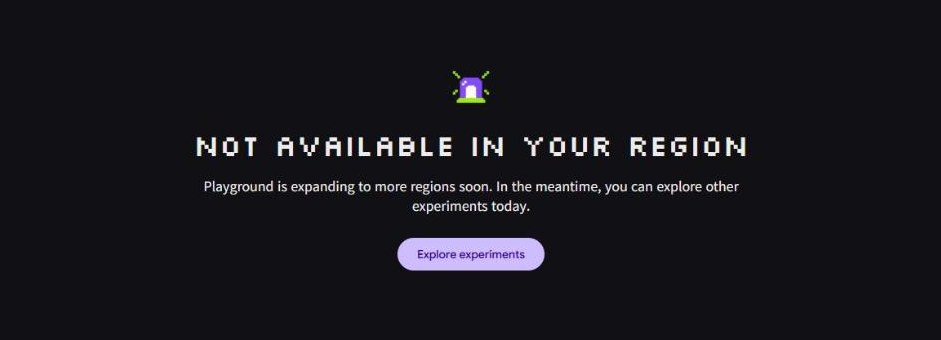
The help center also says more countries are on the way, but there are no dates or country lists yet. Since Google limits it to US residents 18 and over, it makes more sense to wait for the rollout than to try to get around the region check.
Unity Spark: where Google Playground is headed
Google says Google Playground will soon connect with Unity Spark, a tool from the game engine maker Unity aimed at creators who want to push an idea further. Google describes it as bringing deeper game mechanics, detailed 3D graphics and Unity’s own engine into the mix. The idea is that you begin with one line of text in Playground and later move up to bigger Unity projects. Games built that way will still be playable by anyone on Playground.
Unity Spark is still in testing. Google says closed beta testing will open soon, without giving a date.
The bottom line
Google Playground is a fun, low-pressure way to turn a game idea into something you can actually play and send to a friend, and playing other people’s games costs nothing. If you are in the US and over 18, joining the waitlist or trying the free tier is a cheap way to see whether you like building before paying for higher limits. Everyone else will have to wait for the wider rollout.
If you enjoy Google’s browser experiments, try singing with blobs in our Blob Opera guide or making a quick tune with the Chrome Music Lab Song Maker. Both work anywhere, no account needed.