
Online drawing games with friends are one of the easiest ways to get a group laughing on a video call or at a party: someone sends a link, everyone joins from their own device, and a minute later people are scribbling and shouting guesses. The three names that come up again and again are skribbl.io, Gartic Phone and Gartic.io, and they are not the same kind of game.
On October 21, 2026, we opened all three on a PC, created rooms, went through the settings and played a round where we could. Below is how each one works, the exact limits we saw on screen, a few things that caught us out, and which one fits which group.
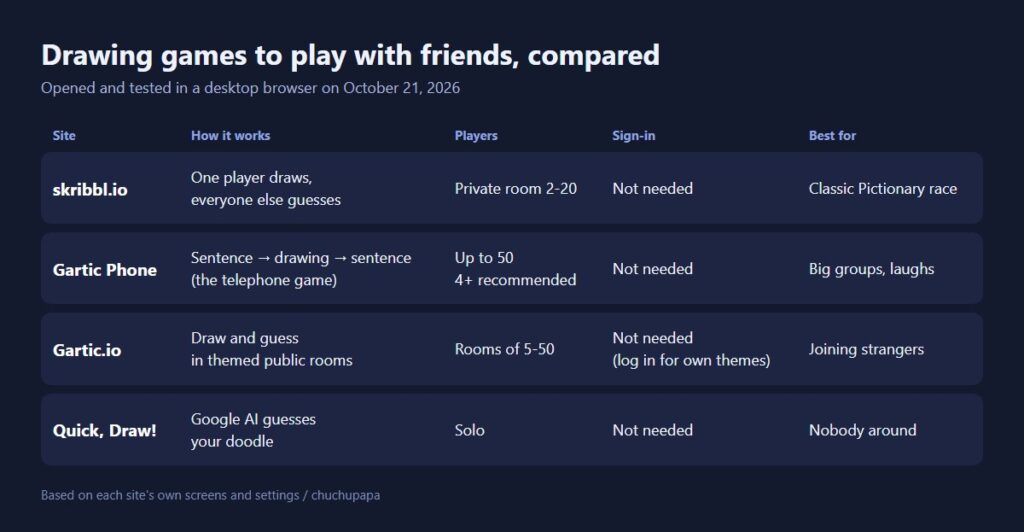
Which of these drawing games with friends should you pick?
If you want classic Pictionary, where one person draws and the rest race to guess, go with skribbl.io or Gartic.io. If you have a bigger group and care more about funny results than scores, Gartic Phone is the one. If nobody is around, Google’s Quick, Draw! lets an AI guess your doodles instead. None of the drawing games with friends below asked us to create an account to play.
skribbl.io: the classic of online drawing games
On skribbl.io, as in most drawing games, players take turns picking a word and drawing it while everyone else types guesses into the chat. Guess correctly and you score points; the highest score after the last round wins.
Setting up a private room
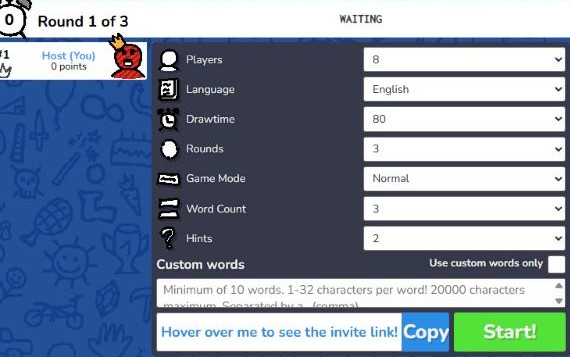
Type a name, choose a language, and press “Create Private Room.” The room settings let you choose 2 to 20 players, a drawing time from 15 to 240 seconds, and 2 to 10 rounds, plus a game mode (Normal, Hidden or Combination), how many words the drawer picks from and how many letter hints appear. You can paste in your own words separated by commas (at least 10) and tick “Use custom words only” to play with inside jokes. The language list includes 28 languages, so mixed groups can pick one everyone knows.
What a round looked like
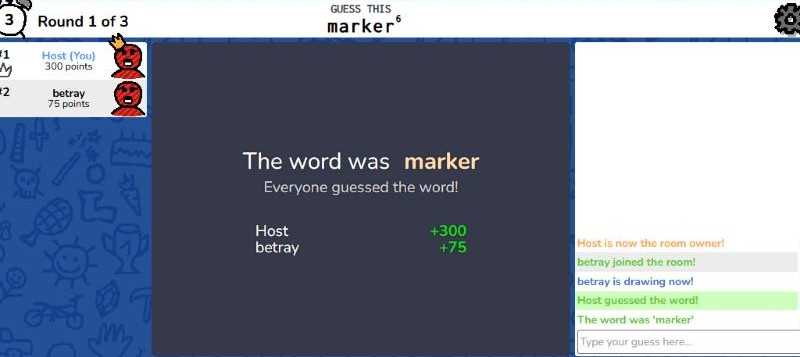
We joined the room from a second tab and started a game. The drawer got the word “marker,” while the guessing screen showed only six blanks and a small “6” for the letter count. As soon as we typed the right word, the round ended: the guesser got 300 points and the drawer got 75.
skribbl.io shows banner ads around the board. Its news panel also notes a 2022 redesign that added mobile support, an undo button and up to 20 players in custom rooms.
Gartic Phone: the telephone game, but with drawings
Gartic Phone is the odd one out among these drawing games: it is closer to the party game Telephone. Everyone writes a sentence, the next person draws it, the next describes that drawing in words, and so on. At the end, the group watches each chain unfold, and the gap between the first sentence and the final drawing is the whole point. The site’s own how-to even recommends getting everyone on a voice call such as Discord or Zoom.
Lobby, presets and custom settings
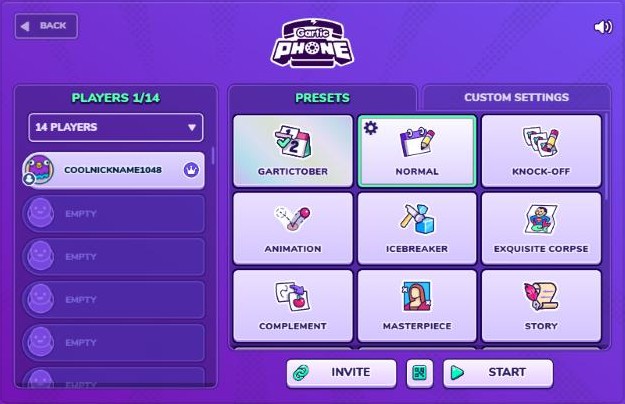
Pick a character and nickname, press Start, and you land in a lobby (we saw a video ad before the lobby loaded). On the left you set the room size, anywhere from 4 to 50 players. On the right are presets such as Normal, Knock-Off, Animation, Icebreaker, Exquisite Corpse, Masterpiece, Story, Secret and Co-op. Invite copies a link for your friends.
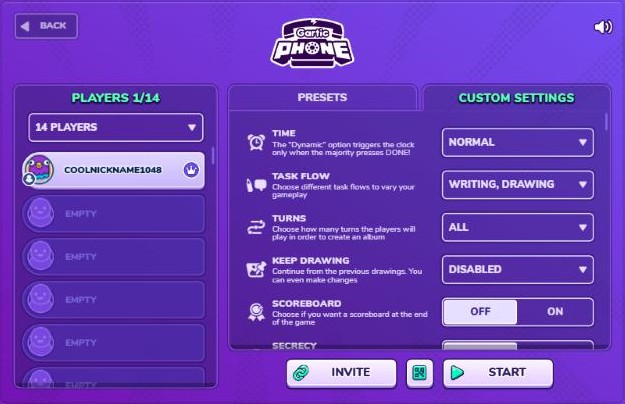
The Custom Settings tab is worth a look. Time can be fast, slow, dynamic or even infinite; the task flow can start with drawing instead of writing; you can set the number of turns, add a scoreboard, hide drawings until the end, switch the canvas shape, and turn on Moderation, which the game describes as checking interactions before they are shown. That last one sounds handy with kids or in a classroom.
Why you want at least four players
Pressing Start with one player brings up a “Wanna try?” message saying the game plays better with at least four. You can continue anyway, but with fewer people the chains are too short to get funny.

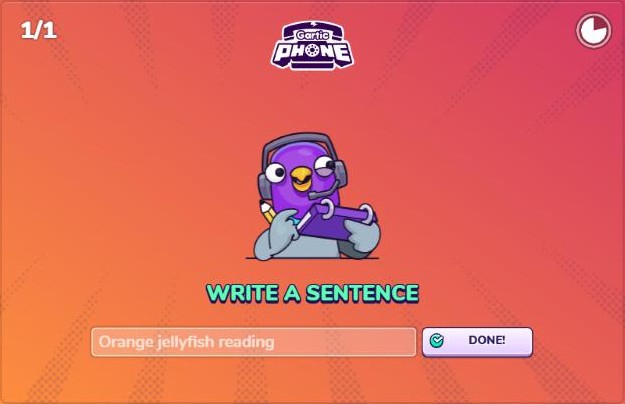
The first step is “Write a sentence,” with a greyed-out example like “Orange jellyfish reading” to get you started. One more thing we learned: when we opened a second tab in the same browser to act as another player, Gartic Phone treated it as the same person and the first tab was disconnected. Each player should join from their own device. There are also Android and iPhone apps.
Gartic.io: drawing games in themed public rooms
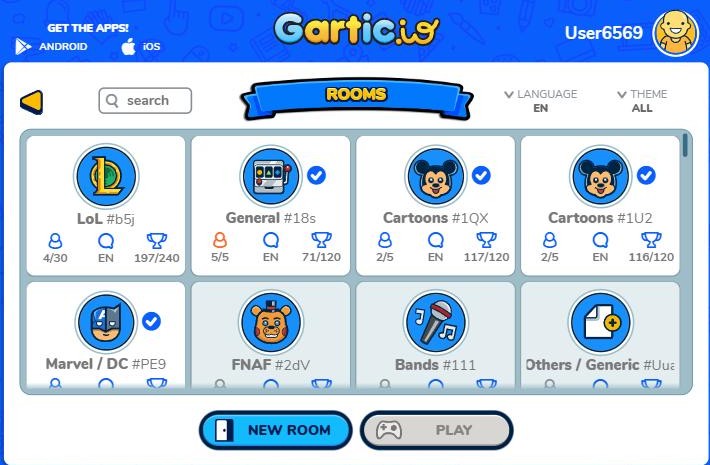
Gartic.io plays like skribbl.io, but it is built around public rooms with themes. The room list shows each room’s theme, current and maximum players, and target score. When we looked, there were 98 English rooms listed, most of them empty and a handful with players, with themes like LoL, Cartoons and Marvel / DC.
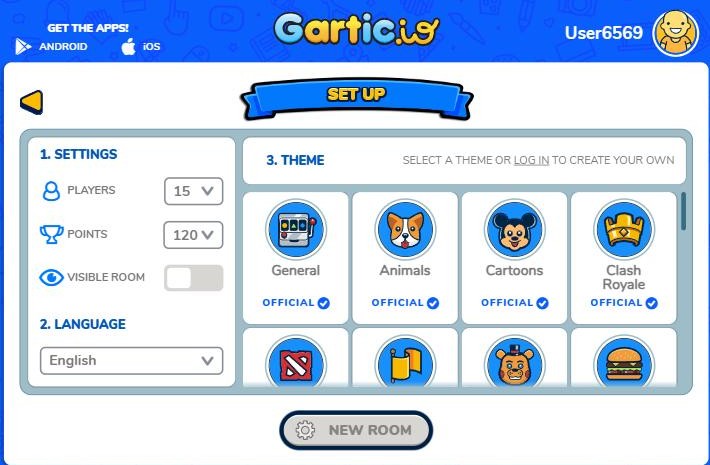
Creating your own room takes a few clicks: choose 5 to 50 players and a target score from 70 to 480, then switch “Visible room” off if you only want friends to join. Official themes range from General, Animals, Foods and Objects to Pokemon, Minecraft, Harry Potter and Verbs, and logging in lets you build a theme of your own.
Playing alone? Try Quick, Draw! instead of multiplayer drawing games
No friends online? Google’s Quick, Draw! gives you a word and 20 seconds to draw it while a neural network tries to guess what it is. It works differently from the other drawing games here, but it is a fun way to warm up.
Tips for better drawing games with friends
- Match the game to the group: three to six people who like a contest suit skribbl.io; four or more who want laughs suit Gartic Phone; if you cannot gather people, Gartic.io’s public rooms have strangers to play with.
- Add your own words: skribbl.io custom words (10 minimum) make the game personal, with family names, office in-jokes or class vocabulary.
- Shorten the timer once everyone gets it: dropping skribbl.io’s draw time adds pressure fast.
- Keep private links private: anyone with a room link can join, so do not post it publicly.
- One device per player: as we found with Gartic Phone, multiple tabs on one browser may count as one person.
The bottom line
For a quick Pictionary race, skribbl.io is the simplest of these drawing games with friends: make a private room, share the link, press Start. For a bigger group that wants chaos and a good laugh at the end, Gartic Phone is hard to beat, especially with its custom settings. And if you want more browser games that work over a shared link, try piecing together a painting in Google Puzzle Party or conducting singing blobs in Blob Opera.